
For vocal songs, lyrics matter as much as the notes. Lyrics mode is a dedicated input mode that lets you walk through your melody beat by beat and type a syllable under each note — without ever touching the mouse.
Entering lyrics mode
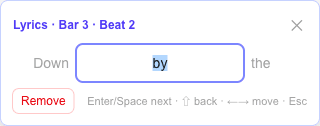
Press L or click the Lyrics button on the toolbar. The lyrics panel opens in the bottom-right corner (temporarily replacing the effects panel), focused and ready to type. The score stays fully visible the whole time.
The typing flow
- Type a syllable, then press Enter or Space — the syllable is attached to the current beat and the cursor jumps to the next note, skipping rests automatically.
- The panel shows the previous and next syllables for context, so you always know where you are in the line.
- Use ← and → to move freely between beats — at the edge of the text field the arrows leave the field and move through the score (rests included), so fixing an earlier syllable is just a few keystrokes away.
- The Remove button clears the syllable on the current beat.
- Press Esc or L to leave lyrics mode; the effects panel comes back.
Korean, Japanese and other IME input
Lyrics mode is composition-aware: while your input method is still composing a character (for example assembling Hangul syllables), Enter and Space finish the composition instead of jumping to the next note. Type naturally — the mode only advances when a syllable is actually committed.
How lyrics appear
Each syllable is stored on its beat and rendered under the staff, aligned with its note — the standard convention in published vocal scores. Because lyrics live on beats, they stay attached correctly when you copy, paste or repeat passages.
Tip: one syllable per note is the norm. For a melisma (one syllable sung across several notes), put the syllable on the first note and leave the following beats empty.
Songs with a melody staff
When the song has a vocal melody staff (Generate melody in the sidebar, or a melody track brought in from a Guitar Pro file), lyrics belong under that staff, as in a lead sheet. Pressing L then switches editing to the melody automatically — the panel reads Lyrics · Melody and walks the melody notes — and leaving lyrics mode returns you to whatever you were editing before.
Lyrics travel with the melody: generating a melody moves any lyrics you had typed on the guitar track onto the new staff, regenerating keeps them, and removing the melody puts them back under the tab. When the rhythms differ, each syllable lands on the note that starts at the same moment, so nothing is lost.
See also: all keyboard shortcuts.