
TellMeScore has no accounts and no cloud — your music is stored on your side, in two complementary ways. Understanding both takes a minute and makes losing work practically impossible.
Autosave (in your browser)
Everything you do in the editor is saved to your browser's local storage as you type. Close the tab, restart the computer, come back next week — the editor reopens exactly where you left off. There is nothing to click and no "unsaved changes" dialog to fear.
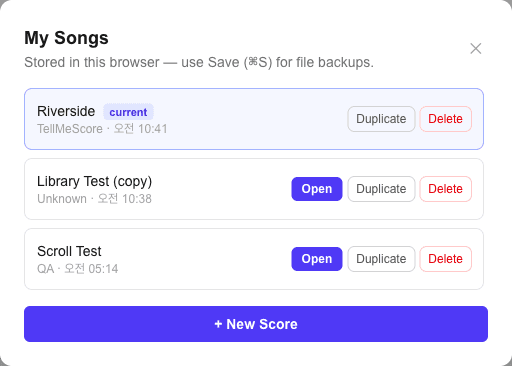
You can keep as many songs as you like: click Songs in the header to see everything stored in this browser, switch between songs, duplicate one as a starting point, or delete what you no longer need. + New Score always starts a fresh song without touching the others.
Two honest limitations, because autosave lives in the browser:
- It is per browser, per device — work started in Chrome on your laptop isn't visible in Safari or on another machine.
- Clearing browser data (site data / local storage) deletes it.
Song files (.tmscore.json)
For backups, sharing, and moving between devices, save your song as a file: press ⌘S or click Save in the header. You get a .tmscore.json file named after your song — a plain, versioned JSON document that fully describes the score.
To load one, press ⌘O or click Open. Opening a file is undoable — if you opened the wrong song over your current work, ⌘Z brings the previous song back.
Rule of thumb: rely on autosave while working, and save a .tmscore.jsonwhenever you finish a session you'd hate to lose. Files on your disk are covered by your normal backups; browser storage is not.
What about Guitar Pro or MusicXML?
You can open them in the Viewer — view, play and print Guitar Pro (.gp3–.gp5, .gpx, .gp) and MusicXML files right in your browser (how it works), and Open in editor… there brings one six-string track into the editor as a new song, optionally with a second track as the vocal melody staff. .tmscore.jsonremains the only save format. If you're curious what's under the hood, the AlphaTex panel at the bottom of the editor shows the live text notation your score compiles to.
Next: put it on paper with printing & PDF, or review the shortcuts that make saving a reflex.